- Published on
Devlog #71 - PxLocale
Previous: https://www.patreon.com/posts/devlog-70-pxskin-157848112
Last devlog was about getting PxSkin into a real place. Frames, controls, scrollbars, settings, skin switching, the character window, and modal dialogs all started moving into the new retained GUI system. This week kept going on that same path, but pushed the GUI into a more practical problem: localization.
I knew localization would have to happen eventually, but I did not want it to be a quick find and replace pass. It is easy to replace English strings with lookups and feel like the job is done, but that only works until the first time a window is already open and the language changes. If a window grabs the English text once when it is created, then the GUI is only holding the final text. It is not holding anything it can resolve again later.
That forced a bigger design question. What kind of text is the GUI actually storing?
There are really two kinds of text in the client now. Some text is retained GUI text. Window titles, settings labels, tab labels, combo box items, and button labels can sit on screen for a long time, so they need to remember where they came from and refresh when the language changes. Other text is immediate text. A modal opens right now with a title and message. A notification is queued right now. A number is formatted right now. That kind of text can be resolved at the moment it is used.
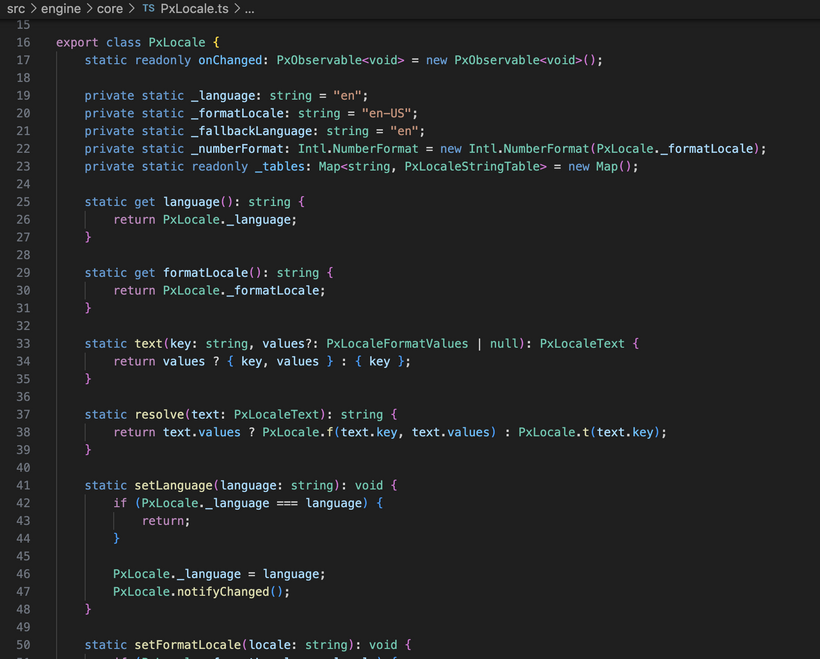
The locale system now supports both paths. The goal is not to make the call sites clever. The goal is to make intent obvious. If the GUI is storing text, it usually stores something that can be refreshed later. If it is showing a raw dynamic value like a player name, item count, clock, or debug string, that is fine, but the call site has to say that it is raw.
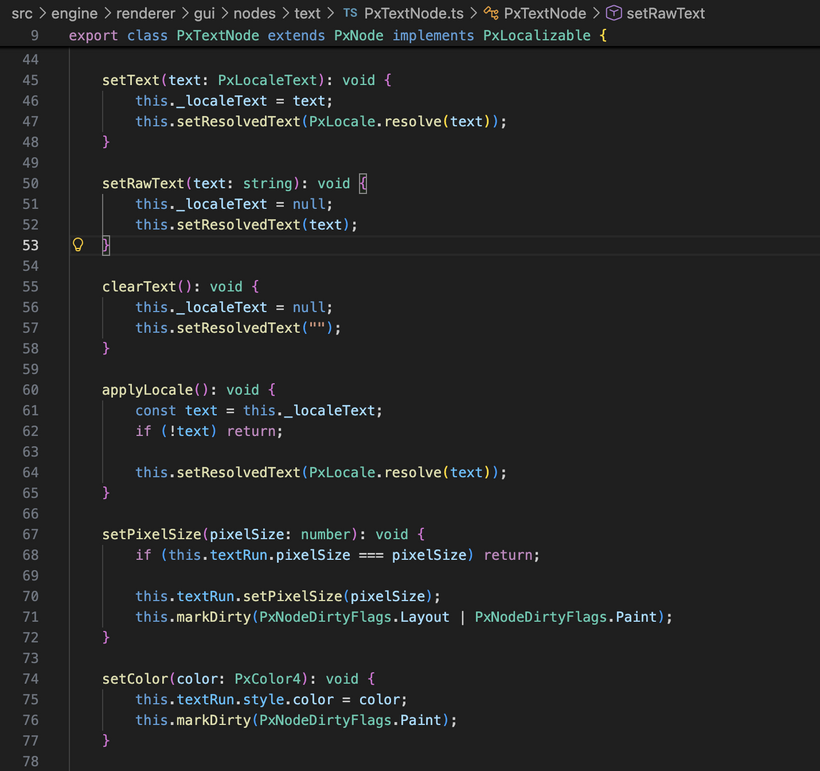
This meant the renderer text nodes had to learn about localization too. Normal text nodes and wrapped text nodes can now store localized text and refresh themselves when the language changes. The GUI root listens for a locale change, walks the retained GUI tree once, applies localization to everything that supports it, and marks the tree dirty. That is the same model as skin application. I do not want every label in the game registering its own listener and then needing its own cleanup path later. One traversal is simpler and more predictable.
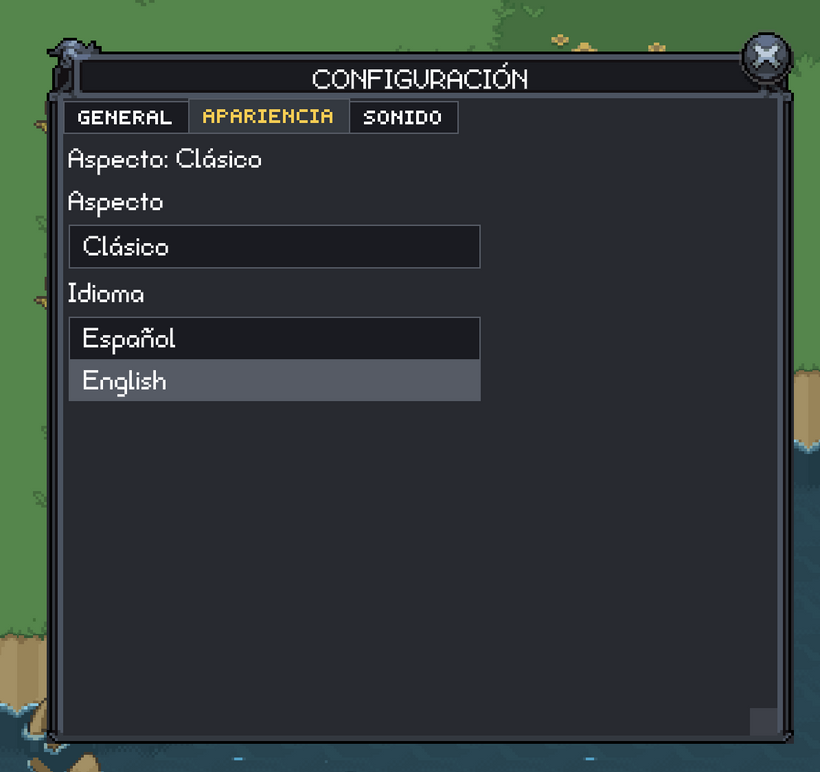
The settings window became the test case for this. It now has a localized title, localized tab labels, localized settings labels, localized combo box items, and a language combo. Changing the language stores the setting, updates the locale system, and refreshes the retained GUI tree. The first real test language is Spanish. Not because Spanish is the only target language, but because the current font atlas already supports the Western European glyphs needed for it, including accents, ñ, and inverted punctuation. That was enough to start finding the real text issues.
As soon as Spanish entered the picture, text alignment started showing problems. This is exactly why I wanted a real localization pass early instead of waiting until later. English text lies to you. English uppercase text lies even harder. “SETTINGS” and “BANK” do not stress the text renderer. “CONFIGURACIÓN” does. Accents reach above the normal capital letter area, so any title alignment that only happened to look right with ASCII can start drifting or clipping.
The frame title work turned into its own small engine problem. Frame skins already had title positioning data, but that was not enough once titles could change language and glyph height. The better model is that the skin describes the usable title area inside the frame art. Classic has a decorative header where the usable text band is not the whole header. Minimal is just a flat filled rectangle, so it can use the whole title area. The frame then puts the title text into that rectangle and centers it there. The small position value still exists, but only as an art nudge, not as the entire layout mechanism.
That took a few passes because there are several ideas that need to stay separate. Text has a measurement box. A frame has a title rectangle. A skin can have an optical nudge. Those should not all be competing to solve the same problem. Once those roles were separated, the behavior got much more predictable. Frame titles now use tighter alignment so accents are included in title centering, while normal GUI text uses font metrics by default so labels, rows, buttons, tabs, and combo boxes stay stable across different glyphs.
That also exposed some older control layout patterns that were ready to be cleaned up. Some controls were manually centering text from before text nodes owned more of their own alignment. That made sense when the text system was simpler, but it does not fit the current model. The better pattern is that a control lays out a rectangle, and the text node aligns text inside that rectangle. The control should not try to outsmart the text node. I started that cleanup with combo boxes, tabs, and text buttons. The visible issue was Spanish text looking off, but the real issue was that two different systems were trying to own the same layout decision.
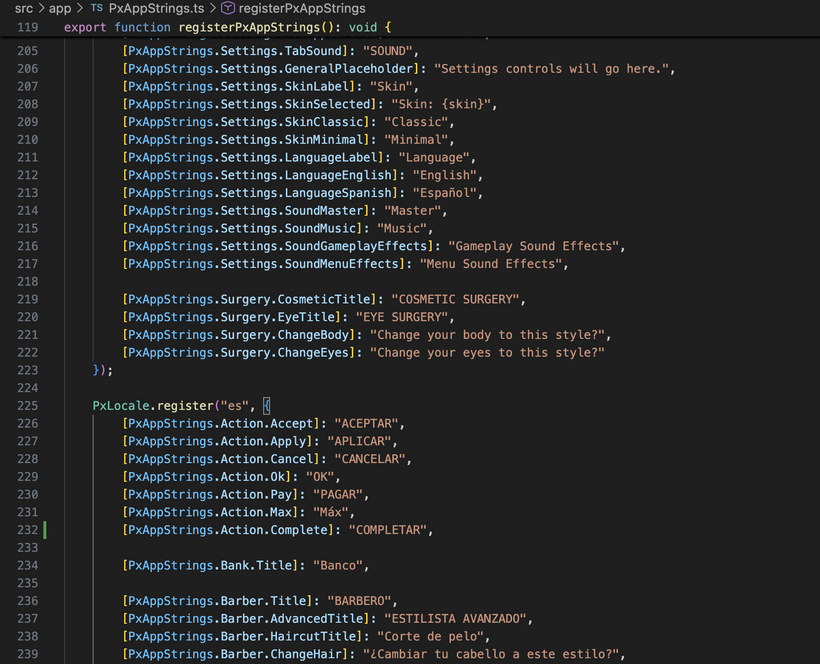
The app string data also moved into a more complete shape. There are now string keys for actions, bank text, barber windows, character windows, constraints, purchase text, quest placeholder text, settings, and surgery windows, with English and Spanish tables. Some of the Spanish strings are not final final, and that is fine for now. This pass is about proving the retained localization path and stressing the engine. Polish can come later.
There was also some cleanup around where common text belongs. A label like “OK” should not belong to the quest window. It is a common action label. The same goes for accept, apply, cancel, pay, and max. Those should not be reinvented by every part of the app. Keeping that ownership clean matters more as the string table grows.
A big part of this pass was moving the short localization helpers into the core locale API instead of keeping an app-side wrapper around them. The app owns the string tables. The engine owns the localization machinery. That split feels cleaner now.
There is still a practical boundary between the renderer and the app. Renderer code can know how to show a generic prompt modal, confirm modal, button, combo box, tab bar, or frame title. Renderer code should not know what coins are. It should not know what a barber is. It should not know what advanced cosmetic surgery costs. The app owns those words, costs, icons, colors, and behavior.
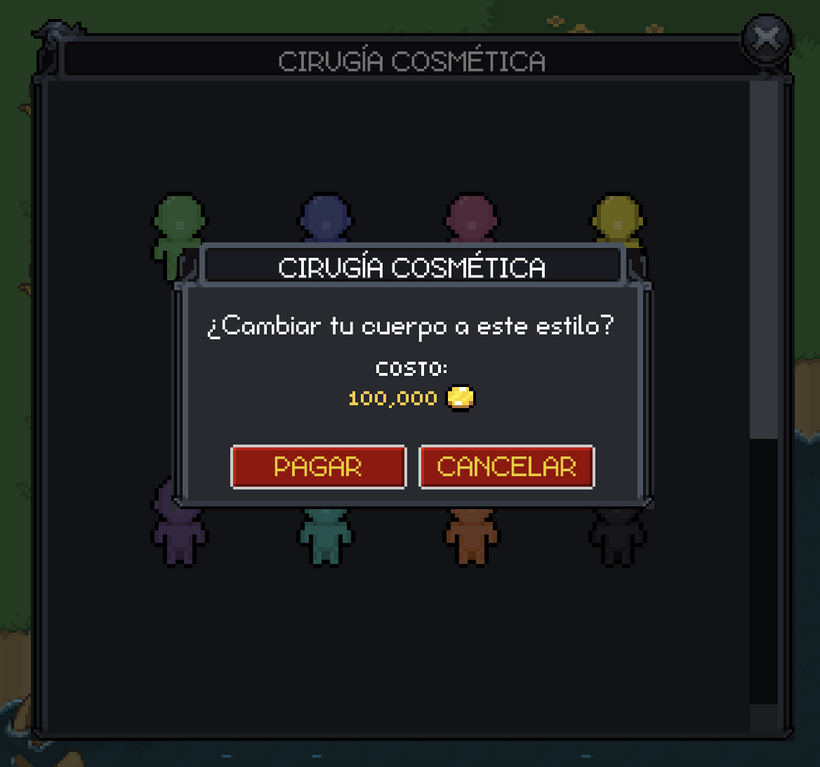
The paid appearance windows still follow that split. The retained windows own the modal flow and emit selection events. The network action handlers own the server messages and constraint checks. The app owns the currency presentation. The renderer currency modal only knows how to display a title, message, cost label, amount text, icon, color, and confirm or cancel buttons. That line still feels right.
The skin cache also got touched because changing frame title bounds means changing skin data. The skin loader passes the manifest version through to the skin parts, so the skin manifests and app skin version had to be bumped. This is boring, but it matters. Otherwise you change the data, reload the game, and wonder why nothing changed because the browser is still using the old file. Ask me how I know.
There were some careful moments in this slice because localization touched a lot of low-level text APIs. For retained text, the normal text setter now means localized text. For dynamic strings, the call site uses the raw text path. That distinction is bigger than it sounds because it makes raw strings visible. Debug text is still allowed. Player names are still allowed. Item counts are still allowed. They just have to be explicit.
The important architecture is there now. The GUI can keep localization keys around. The settings window can change language. The root can refresh retained UI in one traversal. Window titles can update. Tabs and combo items can update. Number formatting lives in the locale system. Frame title alignment can handle accented characters without a Spanish-specific offset. And the renderer does not need to know anything about FO2-specific words.
I also spent time looking at performance and cleaning up the shape of the GUI internals. After the localization work was in, I took a Chrome performance trace while doing normal window-heavy interaction: opening windows, closing windows, resizing them, moving them around, dragging things, hovering controls, and generally using the client like an actual game instead of a clean little demo. That trace made it clear that picking was worth tightening.
Picking is the part of the GUI that answers “what is under the cursor?” It sounds small, but it happens constantly. Once the GUI tree has windows, frames, title bars, buttons, scroll views, grids, item slots, skill slots, overlays, modals, and drag previews, walking too much of that tree on every mouse move adds up. The GUI now skips more non-interactive branches earlier during hit testing and avoids some coordinate work until it is needed. The behavior is the same, but the common path is cheaper.
While reading through that input path, I also found a small bug where a pointer down event was being delivered twice to the same node. That kind of thing can hide for a while because the UI mostly still works, but then some control feels strange later. That is fixed now.
The rest of the cleanup was mostly about ownership. The central GUI system still coordinates the frame, but more of the focused behavior now lives in the areas where it belongs. Input helpers are grouped under input. Overlay behavior lives under overlay. Debug stat wiring lives under debug. The renderer side got the same treatment. Preparing cached render work, writing cached geometry, reusing render operations, and submitting batches now have clearer boundaries. The paint display list also got smaller helper pieces for command copying, item writing, and clip state.
This does not really change the screenshots, but it matters for the next set of windows. The retained GUI is no longer just proving that it can draw skinned controls. It has to handle language changes, modal flows, hovering, dragging, resizing, cached painting, and cached rendering while the app keeps growing. This pass was about making those paths a little cheaper and easier to keep working as more real game UI moves over.
The main GUI system is still a large file, but now it is more of a coordinator. It wires the pieces together and owns the high-level flow of the frame without carrying every detail inline. I also tried not to split things into a pile of tiny files just for the sake of it. A huge file is not great, but a folder full of tiny single-purpose files can be just as annoying. The current shape feels better: small related input pieces live together, bigger concepts get their own files, and the root GUI folder is less cramped.
The main theme this week was making the retained GUI behave more like a real application framework. Localization forced the GUI to treat text like state that can update later. The performance and cleanup pass made the input, paint, and render paths clearer while real windows are moving around. Both of those are part of the same goal: porting more game UI without turning every new window into a pile of special cases.
It also proved again why these ports need to happen against real game windows. Clean demos would not have caught half of this. A little demo button saying “OK” would not expose title bounds, accent metrics, combo box alignment, retained locale refresh, modal button ownership, cache busting skin parts, picking costs, or the way window-heavy interaction stresses the GUI. The real settings window did. The real surgeon windows did. The real character window did. Real window moving and resizing did.
That is the pattern going forward. Every old window we port is going to shake out another piece of the engine. Sometimes that is text alignment. Sometimes it is skin data. Sometimes it is modal flow. Sometimes it is input. Sometimes it is performance. The important thing is that the foundation keeps getting stronger instead of turning into one-off fixes.
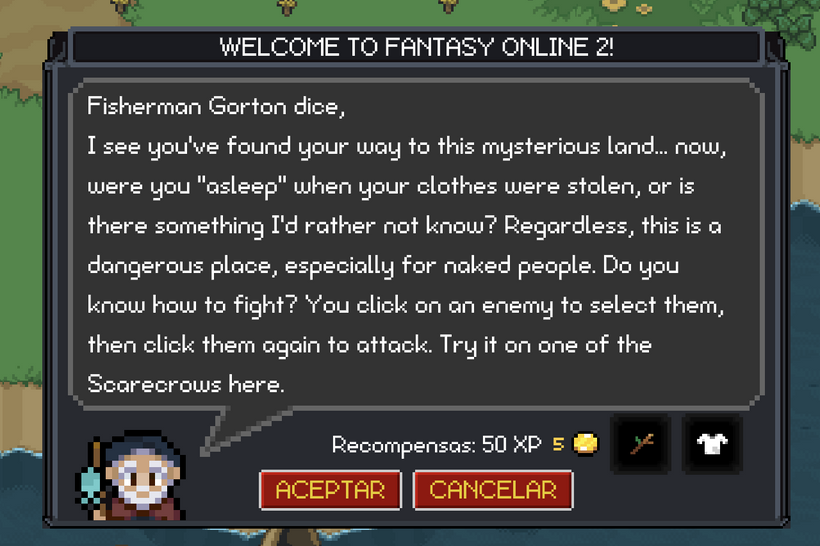
The next real window to move over was the quest window. This was a good test because it is not just a static panel with a few buttons. It has NPC dialogue, reward rows, item displays, XP text, accept/complete flow, and different states depending on whether the quest can be accepted, completed, or is just being viewed. That made it a useful bridge between the cleaner settings-style GUI work and the messier gameplay windows that depend on live app data.
The quest window also pushed more common pieces into reusable shape. Reward item displays now use the same retained item display node path as other GUI areas, and the basic tooltip foundation started coming online from there. Item display nodes, item instance slots, and skill slots can expose simple hover text, so the first tooltip pass now shows item and skill names without building the full rich tooltip system yet. That is intentionally modest, but it proves the plumbing in the right place before descriptions, stats, requirements, sell prices, cooldowns, and other game-specific details get layered on.
Tooltips turned out to be another small feature with a lot of input behavior behind it. They need to appear immediately, follow the pointer closely, avoid the edge of the screen, hide when pressing or dragging, and not fight drag previews or drop targets. The new retained GUI tooltip path already feels better than the old engine in one specific way: when dragging starts, the tooltip gets out of the way, and after the drop completes it can naturally come back if the pointer is still over something useful. That makes item interaction feel cleaner instead of leaving hover text competing with the drag operation.
The quest work also continued to reinforce the same boundary that has been shaping the renderer/app split. The renderer can provide windows, frames, buttons, text, item display nodes, tooltip plumbing, and modal behavior. The app still owns what a quest is, what the NPC says, what rewards mean, which server action to send, and which constraints apply. That separation matters because the GUI foundation should not become a pile of FO2-specific assumptions just to get one window working.
There is still a lot more to do here. The current tooltip pass is only the name-level foundation. The richer old-engine item and skill tooltip content still needs to come over later, and touch screens need a different inspect model instead of pretending they have hover. For items, the likely mobile path is tap-to-select with a real details panel while drag remains movement-based. Skills need different rules because a hotbar tap should cast, not inspect. That is a later wave, but the desktop hover path is now clean enough to build on.
So the retained GUI now has another real gameplay window moving through it, not just framework demos. Localization forced retained text to become refreshable state. The settings and appearance windows proved language switching, skins, and modal flows. The quest window started exercising dialogue and rewards. The performance cleanup made input, picking, paint, and render paths easier to keep fast. Tooltips added another everyday piece of GUI polish. Each port keeps shaking out a different part of the foundation, which is exactly the point.
This week almost got Noob Island to the point where it can be played end to end in the new client. It is not quite there yet, but it is close. The remaining big pieces are the loot window and shop window, and those are the next windows I want to port. If those go well, next week should be the first real “play through Noob Island and tell me what breaks or feels bad” build.
Right before next week’s devlog, I am going to reset all fifth-slot characters. That slot is the testing slot, and I want everyone starting from the same place for this pass. Once the reset happens, I would really like people to play through Noob Island, take notes, and be picky. Not just bug reports, although those help too. I want feedback on the actual flow: quest order, pacing, confusing steps, weak rewards, missing explanations, awkward NPC placement, anything that makes the island feel worse than it could.
The goal is not only to get Noob Island working in the new GUI. The goal is to use this port as a chance to make the beginning of the game better. If a quest feels pointless, say so. If a step should move earlier or later, write it down. If the island needs fewer errands, clearer goals, better tutorial beats, or a stronger final structure, I want to hear that too. Once the core windows are ported, Noob Island becomes the first real test of the whole new client flow, and I want the next pass to be shaped by people actually playing it.
See you in 2 weeks for another PxEngine devlog.
Edit: Devlog delayed one week.
Have Fun & Keep Gaming!