- Published on
Devlog #77 - PxGuildWindow
Previous: https://www.patreon.com/FantasyOnline2/posts/devlog-76-162661063
The Guild window was the main port this week, and it changed almost immediately once I started showing it around. The feedback was pretty consistent: show character levels, make member management clearer, make donations easier, put Guild commands somewhere visible, add another General rank, and add a Guild message board. The message board and extra rank need more server and old-client compatibility work, so they are not part of this pass, but the rest gave me a much better target than simply copying the old window.
The Members tab now has search, an Online filter, and sortable Member, Level, Rank, War, and Seen columns. Seen gives you a compact view of when someone was last active and can be sorted in either direction. Online members are clearly marked, while members without a known activity record are handled separately instead of being given a misleading date.
Level sorting understands the full character journey instead of treating the raw level as the whole story. Normal progression comes first, followed by Rebirth, then Ascension. The default order starts with Guild rank, then uses progression and name to keep the roster stable. Guild Warfare XP is shortened with K and M values in the list where space is limited, while the member details still show the exact number.
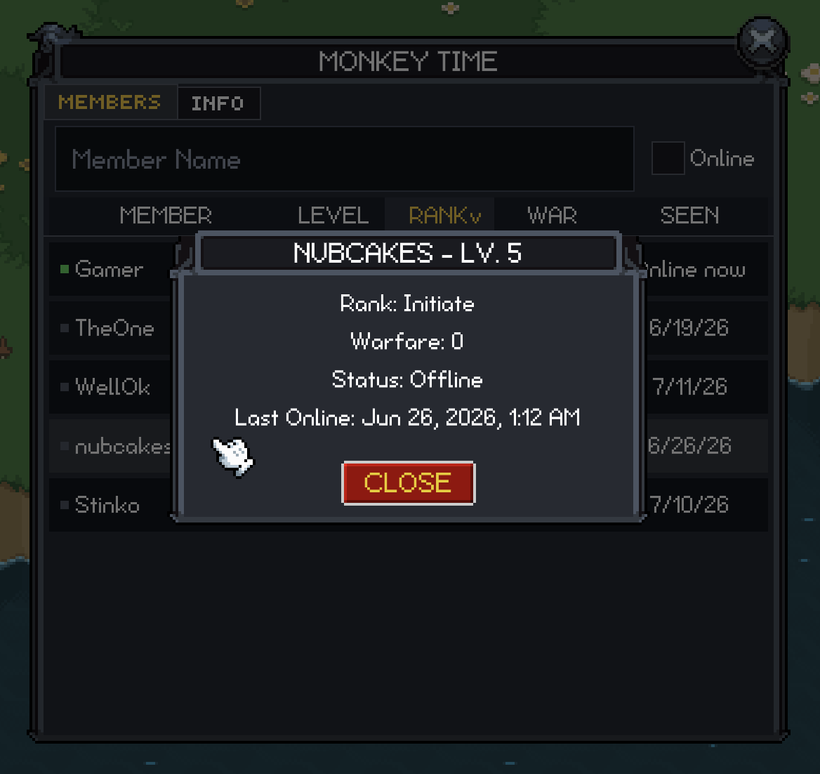
Selecting someone opens a compact detail window with their progression, Guild rank, Guild Warfare XP, online status, and complete Last Online value. If you have permission to manage that member, you can promote or demote them from there. The Classic skin uses the original arrow art from the old interface, while Minimal uses simple text arrows. Whispering respects your Chat setting, and I left kicking on the existing chat-command path instead of putting a dangerous one-click button in the window.
The Info tab shows the Guild Level, Total Donations, Guild Points to Spend, and the active Guild Warfare bonuses. I changed the old Guild Points label because it did not make it clear that this is the Guild’s available balance. Guild commands are listed directly on the page instead of being hidden behind another button.
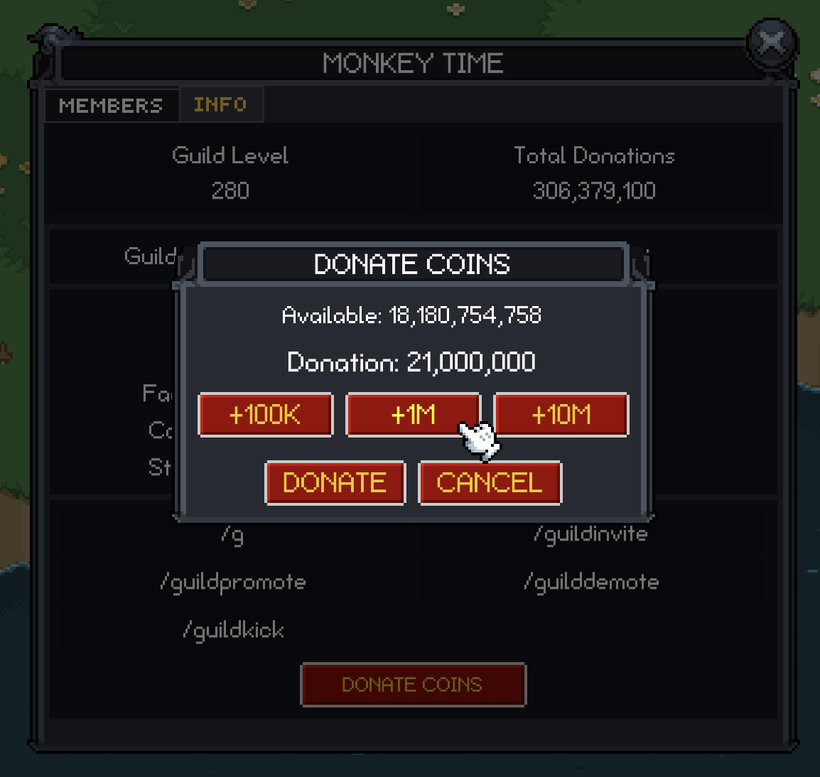
Donations now use an amount picker that starts at zero and lets you build the total from preset values. Options you cannot afford are disabled, and nothing is sent until you confirm the final amount. The Guild window also uses the same standard dimensions as windows like the Codex instead of staying unusually wide.
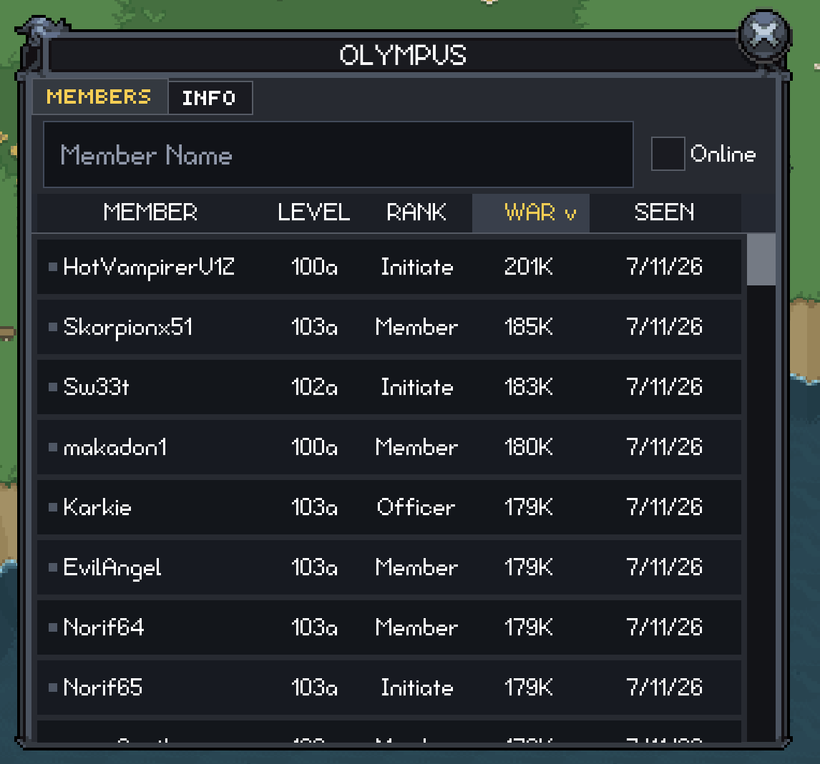
I tested the finished window against Olympus, which currently has more than 230 members spread across normal, Rebirth, and Ascension progression. I went through long names, large Warfare values, every sorting direction, online filtering, different permission levels, donations, both skins, English and Spanish, desktop sizing, and small landscape screens. I also made a real donation through the live server and confirmed that the totals updated immediately and stayed correct after reopening the window.
Once the Guild work was in a good place, I stopped waiting for missing old-client features to find me. I went through the old client feature by feature and turned everything that remains into a prioritized port checklist. That gives me a much clearer path to completion instead of relying on memory or discovering gaps one at a time.
Human death and resurrection were two of the smaller missing gameplay pieces on the list. PX now handles the full sequence for human characters. When you die, movement stops, combat state is cleared, and your character falls from the bottom-middle of the sprite instead of rotating around its center. That makes the fall start at the feet rather than looking like the whole character is spinning over.
The main character gets the full thirty-second resurrection countdown above them. Dead characters can still follow the movement sent by the server toward their grave, so everyone in the zone sees the same sequence. PX can also spawn someone who was already dead when they entered view without briefly showing them alive first.
When resurrection arrives, PX clears the corpse state, raises the character again, restores movement and selection, and removes the temporary death presentation. The local character and everyone else use the same lifecycle, including cleanup if someone disappears from view while dead. The local testing is complete, although I still want one final two-client test of the complete server-driven sequence.
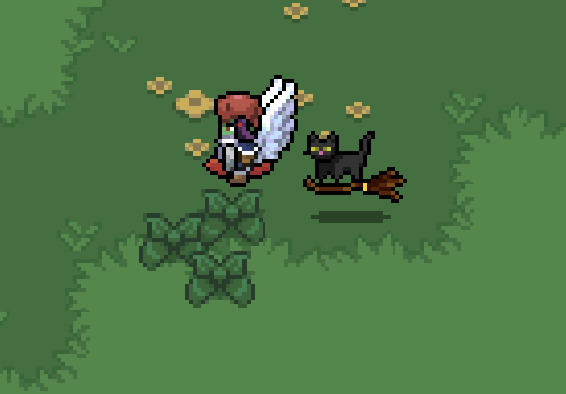
Pets are now real followers in PX too. When you have an active pet buff, the client loads the pet sprite, keeps it synchronized with your visibility, and safely removes or replaces it when the buff changes. Pets are not clickable or targetable, and Show Pet is now part of the normal Settings window.
I rebuilt the movement instead of copying the old direct chase. Your pet follows a sample of your path and aims for a point behind you. It speeds up when it falls farther behind, stops cleanly when it reaches its target, and snaps after a large teleport instead of running across the entire map. New pets also appear behind the direction you are facing rather than directly on top of your character.
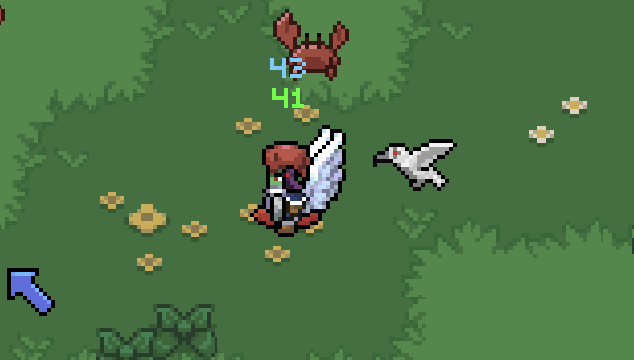
Grounded pets use the visible part of their sprite to stay lined up with the floor. Flying pets use a separate fallback so large transparent or airborne areas do not pull them down unnaturally.
While testing the Guild window on Android, I found one of the largest performance problems left in the PX renderer. The test phone was sitting around 35 frames per second, and lowering the render resolution barely helped. The real problem was how WebGL buffers were being updated for GUI rectangles, images, and text. The graphics driver was being forced to wait on buffers that were still in use.
Changing those uploads removed the stall without lowering visual quality. The same visible game state went from roughly 35 FPS to a stable 120 FPS. The difference was immediate.
The Android wrapper now asks for the fastest display mode the phone supports, up to 144 Hz. It checks again when the app resumes because Android or the phone manufacturer can change display modes while the game is in the background. Android still has the final say, but the very low end test phone I'm using stayed close to a locked 120 FPS while its screen was running at 120 Hz.
iPhone remains limited to 60 FPS in the native wrapper, even on ProMotion models with 120 Hz screens. FO2 runs inside WKWebView, and Apple does not currently provide a supported public way for an embedded WebView to request 120 Hz rendering. The PX renderer can run faster, but the iPhone wrapper cannot present those frames above 60 Hz unless Apple makes that option available. Hopefully Apple will expose 120 Hz in the near future.
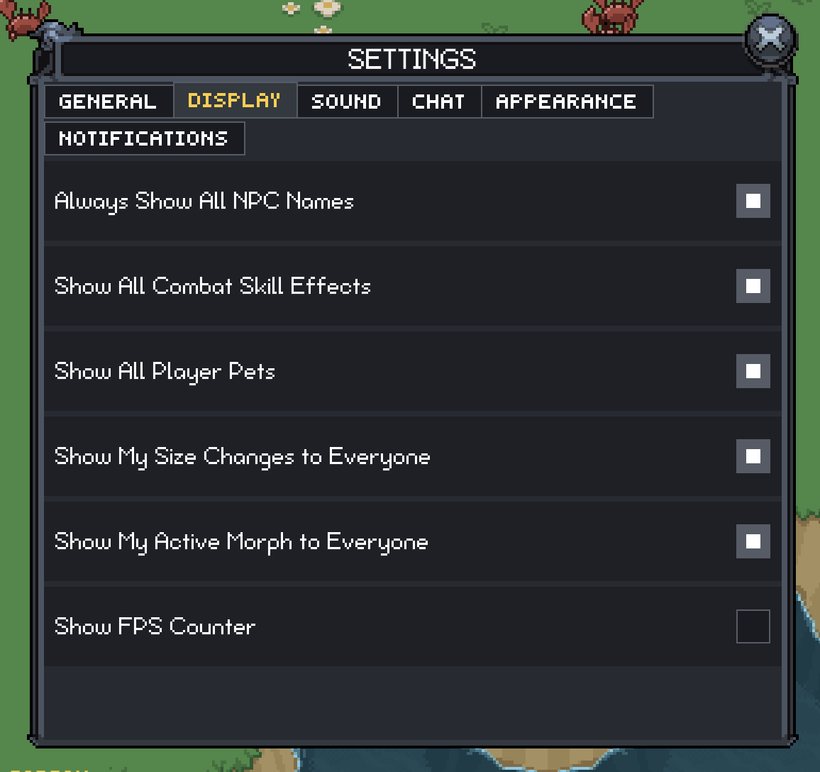
There is now a Show FPS option in Display settings. It defaults to off and controls the counter at the top of the screen, so it is easy to turn on for testing without leaving diagnostic text enabled for everyone. Many of the old settings have now been ported as well.
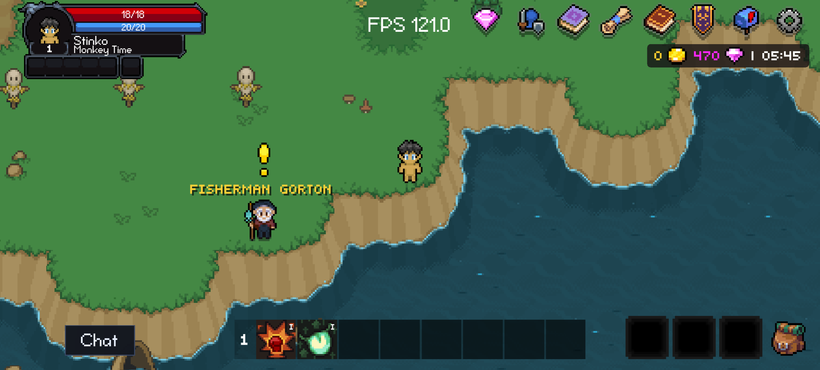
The mobile layout got another pass after that. The top-right buttons stay inside their half of the screen and keep their square shape instead of wrapping unpredictably. Windows can use more of the available height on small landscape screens while keeping their intended size on larger displays. The Skillbook still leaves the skill bar available for drag and drop, and chat stays anchored to the newest message when the software keyboard opens.
Settings also gained a master Chat toggle and an option for NPC names. You can keep NPC names visible all the time, or only show them on pointer hover on devices where hovering is available.
The performance improvement was the visible part of the mobile work, but I spent more time on what happens when the wrapper itself fails. The game can be running perfectly, but that does not help if the app gets stuck on a spinner, loses your session during a temporary network problem, or ends up with a dead WebView that only a force close can fix.
Session restoration, account loading, game startup, and the native bridge all have deadlines now. Normal startup keeps the simple animated loading squares. If something is actually wrong, the app moves into a recovery state instead of waiting forever.
Temporary storage, network, or server failures no longer look the same as signing out. Only a session that is definitely invalid or revoked clears the account. The launcher can also use a safe local copy of your account and character list while checking for newer data in the background, so a weak connection does not have to leave you staring at an empty screen.
Game startup is split into real stages now. The shell checks the current build, downloads it with visible progress, boots it, and waits for PX to report that an authenticated world has actually rendered its first playable frame. The game build is checked before it runs, so a damaged or partially published bundle stops clearly instead of launching into a broken state.
The launcher also starts preloading the current build while you are still on the account and character screens. Pressing Play still checks which release is current, but the matching game bundle may already be cached by then.
If Android kills the renderer, the wrapper creates a fresh WebView instead of trying to reload something the operating system has already declared dead. It checks that your session is still usable, then returns with the same character, server, and engine. Delayed messages from the old renderer are ignored, so they cannot interfere after the replacement starts.
The recovery screen includes Retry Now and Exit. Bans, kicks, revoked sessions, and invalid characters return to the launcher instead of reconnecting forever. If the operating system kills the entire app process, the next launch can also offer to return to the character you were using.
Character creation, customization, and the TOS screen received the same treatment. Forms remain usable with large floating Android keyboards, server errors stay on the correct screen, failed character art can be retried, and the TOS must actually load before Accept becomes available.
I tested cold and warm launches, starting from cached account data while offline, signing out and logging back in, character creation, customization, TOS, both game engines, backgrounding, Wi-Fi loss, network restoration, and Android renderer death. I deliberately crashed the renderer and confirmed that the app process stayed alive, rebuilt the game surface, and returned to the same character.
Android received the deepest destructive testing during this pass. iOS still needs the same renderer and network-loss testing on physical hardware.
iOS audio did receive its own lifecycle pass. Game audio can now continue while the physical Ring/Silent switch is muted. Backgrounding suspends the audio cleanly, and returning to the app restores music and effects without requiring another touch or creating duplicate playback.
All of that mobile work fed directly into the Gem Shop. The purchase flow has gone from being connected in pieces to something I could test from beginning to end on both iOS and Android.
The shop received a larger design pass first. Gems appear before Membership, and subscriptions have their own tab. Gem Notes and memberships share the same card layout and use the normal item, gem, price, and button controls from the rest of the client.
Membership cards show the plan, monthly gems, exclusive item reward, local store price, and a Subscribe button. The monthly item is shown as an actual item instead of being buried in a description. Your active plan is clearly marked, and Manage opens the device’s native subscription settings. Gem Note cards also support the old double-Gem sale presentation.
RevenueCat is now the authority for mobile subscription state. The backend checks which plan is actually active instead of trying to decide everything from a single purchase or subscription event. That matters because upgrades, downgrades, renewals, and cancellations do not always become active the moment the event arrives.
If you upgrade during the same month, the server grants only the difference between the old and new plans. It does not pay the full monthly gem and item reward a second time. Subscription state and purchase results are also tied to the account that produced them, so changing accounts cannot briefly show information from the previous one.
I tested Gamer, Pro Gamer, Ultra Gamer, and Elite Gamer through the native purchase flow. That included repeated purchases, upgrades, reward differences, active-plan display, mail delivery, backgrounding the app, and reconnecting afterward.
The existing Gem Note path was left alone because it was already working. All four mobile Gem Note products were tested on iOS and Android, including the double-Gem sale, and the rewards arrived through mail. Prices come from the native store in your locale instead of being hardcoded in the web client.
The shop also refreshes the actual catalog when a sale begins or ends. Products, bonuses, icons, and the title update together without making you close and reopen the window.
When a purchase or membership reward arrives through mail, PX can show a larger notification with the item icon and a message telling you that new mail arrived. That makes the delivery path much clearer than silently changing the mailbox state and expecting you to notice.
As always, please post comments or feedback here, on Discord, or email me.
King’s Keep releases on Friday, July 17, so I will be focused on that next week. The next devlog will be in two weeks, on Sunday, July 26.