- Published on
Devlog #78 - PxMarket, Battle Passes, and More
Previous: https://www.patreon.com/FantasyOnline2/posts/devlog-77-163406110
Thank you to everyone that has been reporting bugs! As of July 25th, I have fixed all bugs that have been reported via the in-game bug reporter! Press F8 or touch the button in the Settings window and send me all your bugs! You can even send suggestions! Report report report!
We even have the start of a public facing bug/idea voting page:
https://bugdesk.fantasyonline2.com/reports
So report report report! I deal with all bugs the second I see them! And with that out of the way, let's get on with the largest devlog ever.
The Market is finally in PX. This was one of the biggest systems left on the checklist, and it was also one of the ones I least wanted to redesign. People already like how the old Market works. The job was to bring that flow over, keep it familiar, and fix the places where searches or transactions could get crossed while the server was still answering.
The new window keeps the Buy and Sell sides, ten listings per page, item icons, levels, prices, time remaining, search, filters, sorting, pagination, listing duration, fees, and confirmation windows. If you already know how the old Market works, this one should make sense immediately.
Most of the difficult work was behind the buttons. Search results can return out of order, purchases need a real destination in your bag, and listing or cancellation requests can overlap if the client is not careful. PX tracks those actions separately, so an old search cannot replace a newer one, a purchase cannot settle into the wrong slot, and an expired request cannot interfere with the next transaction.
I tested it with real listings. I searched, filtered, changed pages, bought an item, listed another item, canceled it, and checked the fee refund. I also filled all ten active listing slots. The eleventh listing was rejected without taking the item. Full bags, insufficient currency, expired listings, and items below the required level are covered too.
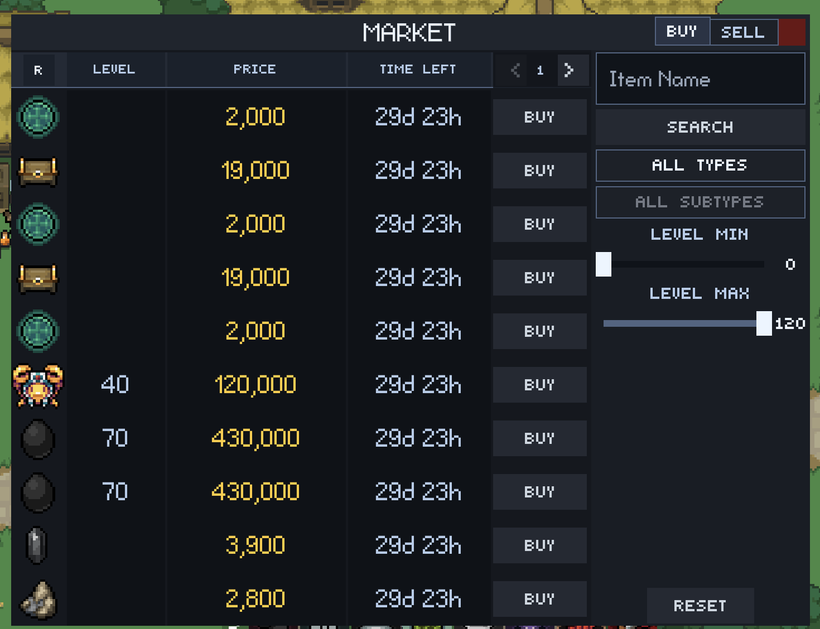
The Market also gave me a reason to straighten out the list controls used across PX. Search, item filters, level range, sorting, pagination, reset buttons, item rows, and side panels had all picked up small differences depending on which window used them. They now follow the same rules, and the Collector has moved onto those controls while keeping its own collection and withdrawal behavior.
Once those pieces were settled, the Broker was much easier to finish. It shares the Market listing grid, filters, sorting, pagination, item display, price controls, and sidebar layout. Selling into a buy order finds the correct eligible item in your inventory, while creating an order uses the same collectible catalog as the old client. The server pagination was corrected too, so translated item names no longer produce incomplete pages or incorrect totals.
Expanded Bank storage is back as well. PX supports all ten Bank tabs, including unlocking new tabs, moving items between them, and receiving updates for tabs that are not currently open. Quick transfers can search the whole Bank for space instead of only checking the tab in front of you.
The Website Gem Shop is now a proper PX window too. It uses the same Gem Note cards as mobile and opens Stripe Checkout with the correct product. Double-Gem sales update the products, icons, totals, and title while the window is still open. The old website-only shop has been retired, so the website and mobile versions finally feel like the same feature.
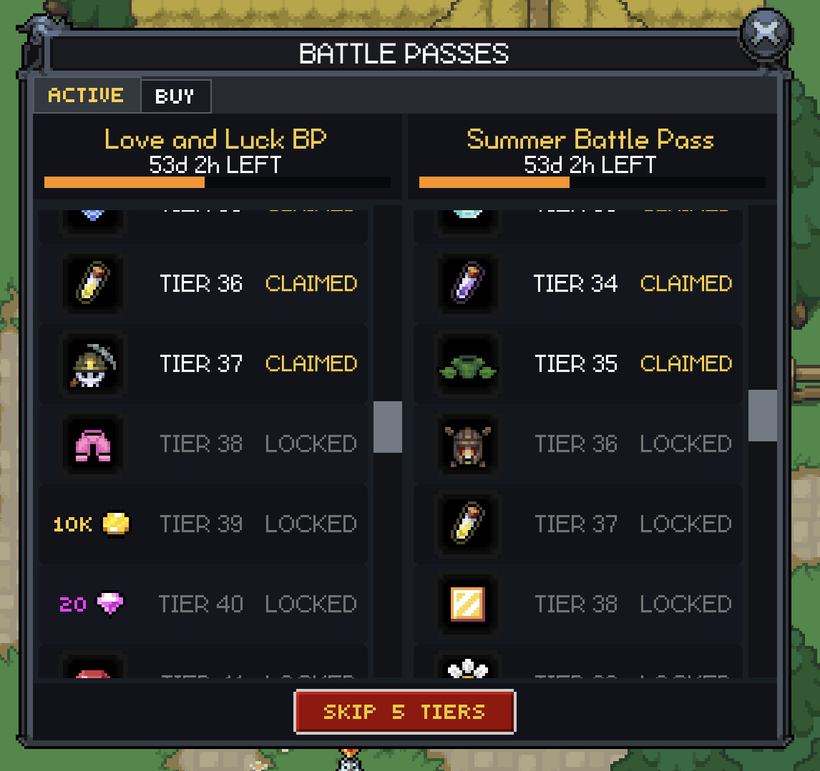
Battle Passes were the other large port in this stretch. The Active side supports up to two passes at once, each with its own expiration countdown, progress bar, tier list, rewards, claim state, and completion action.
Claiming an item reward reserves a real destination in your bag before the request is sent. When the reward arrives, PX uses the normal reward flyout and moves the list toward the next useful tier. An older server update cannot move your progress backward, and one pass can no longer reset or corrupt another pass.
Skip 5 Tiers works across every eligible active pass while respecting the XP requirements and maximum tier of each one. Expired and completed passes stay out of the active list, and the window does not build all of its hidden reward rows until you actually open it.
The layout needed another mobile pass too. The reward grid stays intact instead of collapsing into an awkward single column, both active passes keep the same row shape even when their rewards differ, and the list moves more naturally toward the next useful reward. The old direct database link is back beside the currency and expiration information as well.
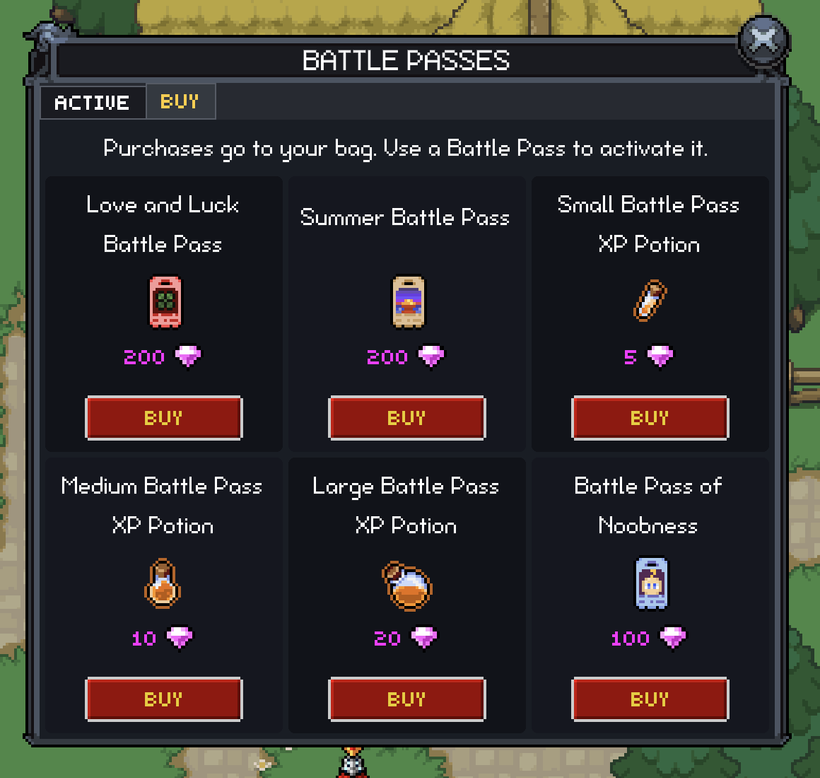
Battle Passes now have a Buy side in the same window. You no longer need to know which NPC shop happens to sell a pass. PX receives the available passes and XP boosters directly, while the server still validates the item, price, currency, and bag destination before anything is charged.
If you do not have enough Gems, PX uses the normal Gem notification and opens the correct Gem Shop. The window opens on Buy when you do not have an active pass and opens on Active when you do.
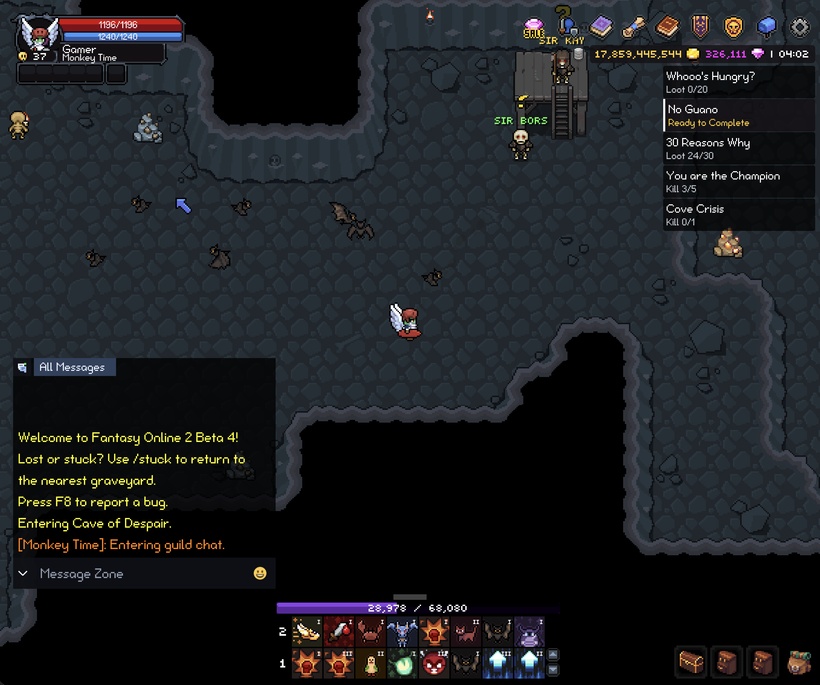
The XP display is back too. It uses the current and required XP values from the server, updates immediately, formats large values cleanly, and handles max-level characters without leaving a broken bar behind.
On desktop, the XP bar follows the complete width and position of the skill bar. If you expand the skill bar to show more rows, the XP bar moves with it instead of floating where the old one-row bar used to be. Compact landscape screens use a different layout. The XP bar becomes a thin strip along the physical bottom edge of the display, with the skill bar, horizontal bags, and collapsed chat button arranged above it.
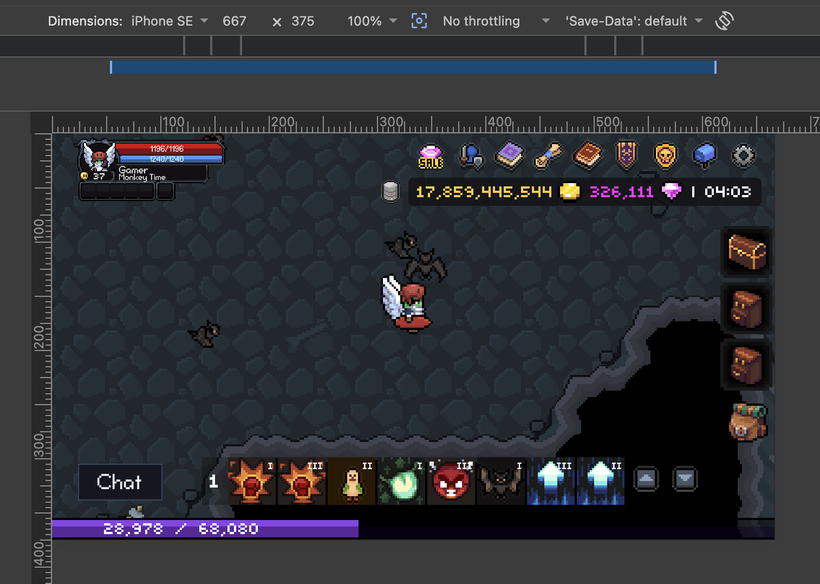
Touch players can now reach all eight skill bars without a keyboard. Compact screens place large Up and Down controls together on the right side, where they are easier to hit with a thumb. Larger screens keep the familiar vertical arrangement from the old client. The controls wrap from the last bar back to the first, and your selected number of visible skill-bar rows is saved without letting compact mode overwrite your desktop choice.
Ultrawide desktop displays also have the old conditional 21:9 gameplay limit again. It only turns on for the website, CrazyGames, and Steam when the display is actually wider than 21:9. Normal desktop resolutions are untouched, and native mobile is excluded.
Party state and the on-screen Party display are ported too. Party members no longer disappear just because they leave the nearby actor set. PX keeps their latest appearance, progression, health, energy, effects, death state, and availability until the server roster says they actually left.
Party members use the same actor information display as your own character and selected actors. Their panels start smaller, but they keep a readable minimum so names, health, energy, and effects do not become tiny on crowded screens. The Party display also stays out of the way of chat and the mobile keyboard.
Dungeon Entry and Party readiness are working as well. Both old dungeon families route their three difficulties into a localized window with the dungeon description, suggested level, modifiers, Party roster, and readiness state.
PX catches the old case where moving after starting dungeon entry could prevent the transition without explaining what happened. It now tells you to stop moving before sending Ready. Closing the window, changing the Party, changing zones, or letting the attempt expire resets the entry cleanly.
The compact layout was tightened after the first pass too. Solo characters see the proper Party-required state instead of a fake waiting member, descriptions adjust when a scrollbar appears, and the roster remains readable on narrow landscape screens.
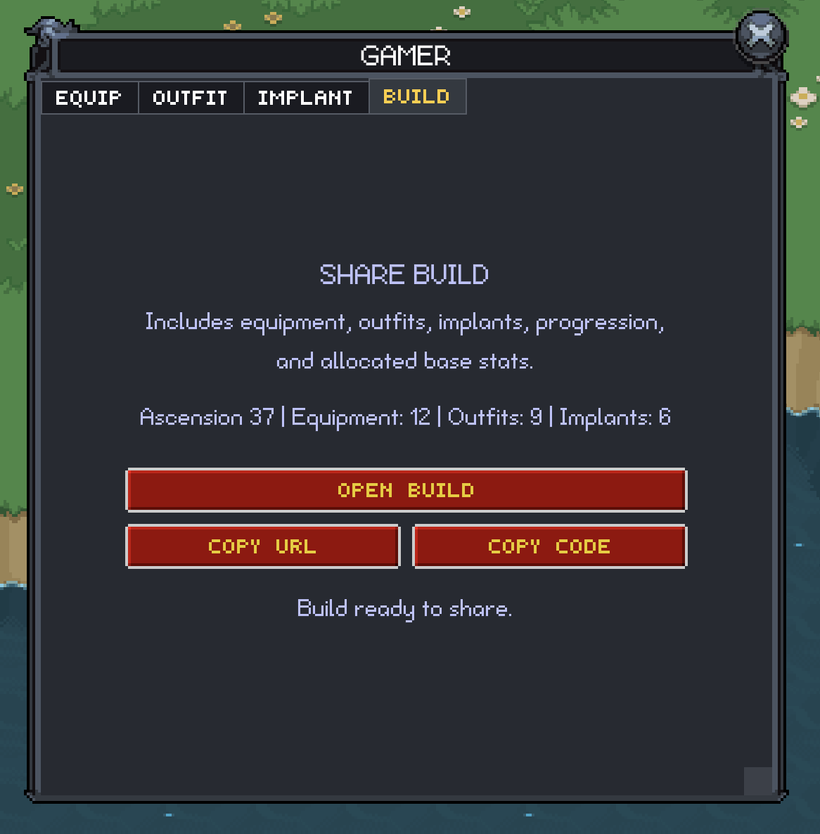
The Character window gained a BUILD tab. It summarizes your equipment, outfit, implants, progression, and allocated stats. From there you can open the build on the database website, copy its URL, or copy a compact build code.
The same build produces the same code, and it does not contain account details, private item-instance data, or unique item IDs. Sharing temporarily disables itself while the relevant inventory state is still changing, so you do not copy a half-updated build. There is also a direct Database button in the HUD now.
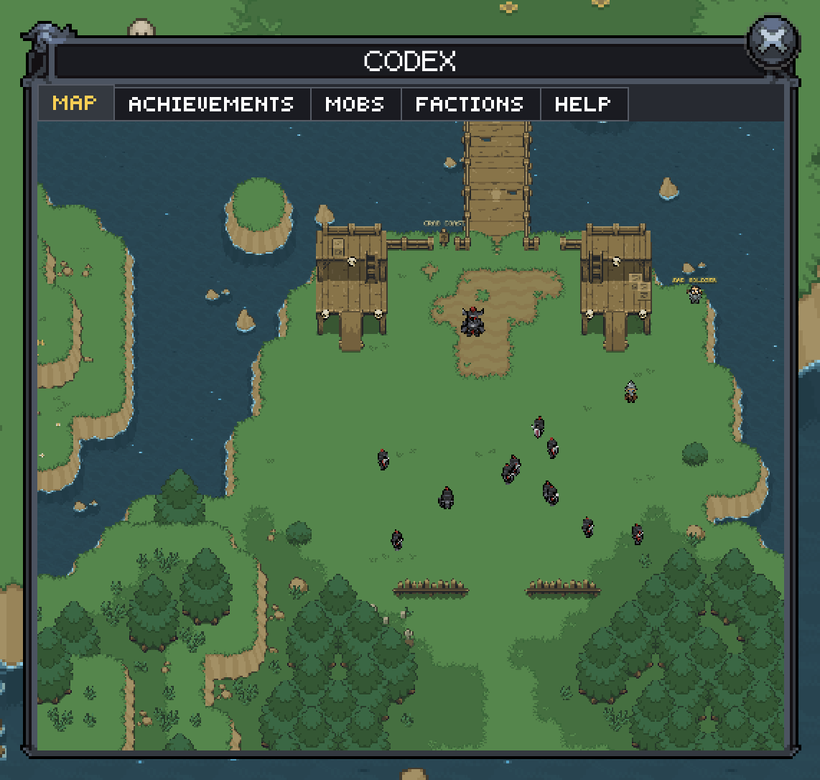
The in-game Codex now opens with a Map tab. It uses its own camera to render the current zone directly inside the window, follows your character by default, and resets after a zone change.
You can drag the Map with a mouse or one finger, zoom around the pointer with the mouse wheel, and pinch with two fingers on a touchscreen. Panning and zooming are limited so you cannot lose the entire zone outside the window. The Map stays on the GPU and only renders while its tab is visible. Markers and the final multi-zone performance pass are still planned.
Firework consumables finally have their effects again. I did not copy the old Babylon particle systems. The PX versions use the existing pixel particle renderer.
Each firework launches from your character, rises to a slightly randomized height, leaves a trail, and opens into one of three larger patterns. The warm peony, green and aqua double peony, and blue and purple chrysanthemum are tied to the same consumables used by the server. The launch is sent to the zone, so everyone nearby sees the same firework.
Selecting another character restores the old quick-action strip beside their actor panel. Whisper opens the existing conversation, while Party Invite and Add Friend use the same checks as their chat-command versions. The actions disappear when you select a mob, your own character, or nothing, and they respect the Chat setting.
Rebirth and Ascension are easier to recognize in actor panels too. Rebirth characters use the cracked silver skull from the old client, while Ascended characters use the matching gold skull. The old R and A prefixes were removed from the level text because the skull already communicates the progression more clearly. The same presentation is used for your character, selected characters, and Party members.
A few combat rules came across during the same review. Dead characters now stay in the correct state throughout the grave and resurrection sequence, Rebirth and Ascension ceremonies have their countdowns and warnings again, and root effects stop new local movement without breaking movement coming from the server.
Attack and loot interactions now require both the normal distance and a clear collision path. That closes the Border Hopping exploit where targeting an enemy through blocked terrain could pull you across the boundary. Legitimate nearby combat is unchanged. Thank you to Ketchen for reporting it.
Asset loading also handles unstable connections better now. A temporary failure no longer means an NPC, map, or collision file is simply gone for the rest of the session. Downloads can retry within a limit and recover from a bad cached response when needed.
Steam authentication is ported now too, closing another major checklist item. Steam achievement reconciliation is back as well. When a Steam character loads, PX compares the achievements stored by the game with the ones currently present on Steam and synchronizes anything missing. Newly earned achievements still use the normal immediate unlock path.
CrazyGames was another large platform gap. PX now accepts the same user, authentication ticket, character, slot, and selected world supplied by the deployed CrazyGames host. Authentication stays owned by the host and server instead of being recreated inside PX.
The platform also receives the correct loading and gameplay signals, including when the game becomes playable, when a real game window pauses gameplay, and when the session ends. CrazyGames audio and chat restrictions temporarily override the game without overwriting your saved preferences, and the room invite state follows your current server, zone, and instance.
CrazyGames now has a complete PX Gem Shop instead of an informational placeholder. All four Gem Notes and all four memberships are shown together in one scrolling catalog using the same product cards as the website and mobile stores. Checkout still goes through the existing CrazyGames and Xsolla integration.
The hosted purchase, subscription, cancellation, and recovery checks are complete, so CrazyGames commerce is no longer sitting on the remaining port list.
The Website, mobile, and CrazyGames shops now record the same parts of their purchase funnels. This should make it easier to see whether someone leaves before checkout or runs into a problem that only affects one platform, without moving payment handling into the game client.
The really big mobile news is that Apple approved the second iOS release, all four monthly memberships, and the entire subscription group. The app is now at Pending Developer Release, which means the binary and subscriptions can be released publicly whenever I decide to make them available.
TestFlight testing confirmed that every membership and Gem Note opens the correct Apple purchase sheet with the expected product and localized price.
The mobile app now uses PxEngine exclusively during normal play. The old-client code is still available as an emergency fallback, but the engine checkbox is gone and the legacy route is no longer part of the normal launch path. This gives me one version of the game to optimize and support without deleting the fallback before the release has proven itself.
The launch experience received another polish pass too. The shell now shows useful loading stages instead of leaving you with an unexplained animation. Once the PX starfield starts rendering, the loading interface contracts into a centered card so you can see the game coming alive behind it.
The wrapper waits for a genuinely playable frame instead of assuming the game is healthy because a canvas exists. PX reports loading progress, renderer activity, connection loss, and fatal startup failures directly to the shell. Recovery stays out of the way during a normal launch, but the wrapper can rebuild the game surface when something actually fails.
iOS audio received another lifecycle pass as well. Game sound can play while the Ring/Silent switch is muted, backgrounding suspends playback cleanly, and returning to the app restores music and effects without the old beep, lost audio, or another interaction prompt.
Production diagnostics are in a much better place now. The mobile shell and game use separate Sentry projects, with private source maps and native debug information uploaded alongside releases. That makes it much easier to tell whether a failure came from PX or the wrapper.
Native achievements are implemented on both mobile platforms now too. Fantasy Online 2 has 99 achievements worth a combined 990 Game Center points, with the matching set configured for Google Play Games.
PX sends the complete achievement snapshot through the mobile bridge. This means achievements you earned years ago on another platform can unlock after you sign in on mobile, while new achievements continue to unlock as you earn them. The game remains the authority, so this did not require another achievement backend.
The release process has grown along with the app. iOS and Android production builds can now be created and submitted locally, with the debug information needed to investigate production failures.
The Google Play listing and all active Gem Note and membership products have also been localized into eight additional languages. Those updates have been submitted to Google for review.
The last King’s Keep revision is in PX too. The updated map, tileset, mastersheet, and collision data went through the normal map pipeline, and the asset versions were advanced so the revised files replace the earlier cached version.
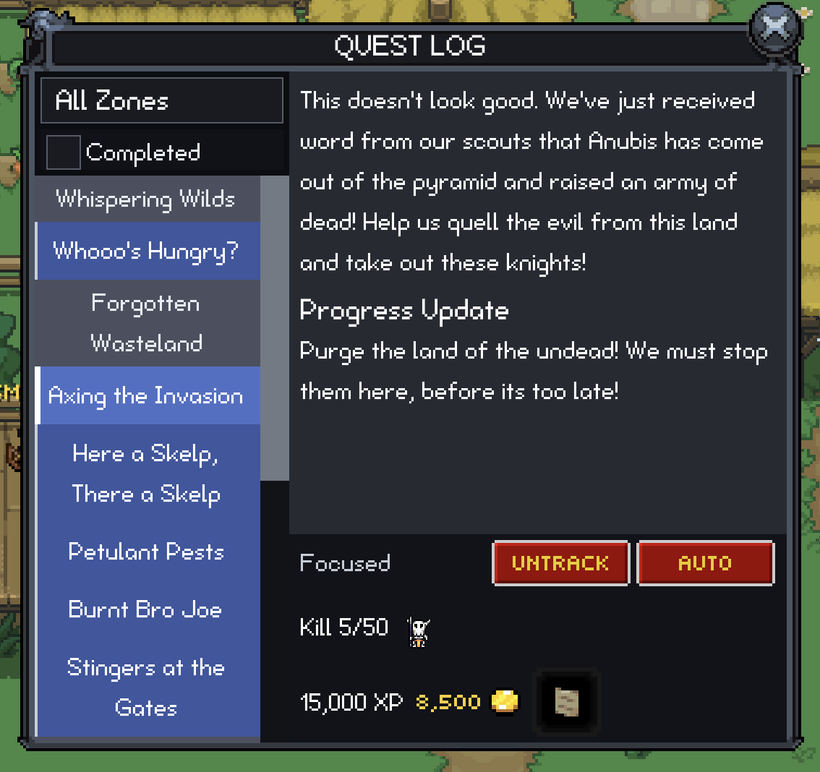
Quest tracking is back too. The Quest Log is no longer the only place to see what you are working on. You can choose a quest to follow, and its current objective appears on the HUD with progress that updates as you collect items, defeat enemies, or complete the next requirement.
The Go button now connects that tracked quest to the footstep navigation system. Pressing it starts a trail toward the next relevant objective, and the route updates as you move. It gives you a direction when you are stuck without covering the world in giant permanent waypoints.
The Quest Log, HUD tracker, and navigation now work as one feature. You can read the full quest, choose what to follow, keep an eye on its progress while playing, and ask for directions when you need them. Your tracked quest is remembered too, so closing the window or restarting the game does not make it disappear.
The Welcome window is back in PX too. It still shows the latest game news, updates, and featured content when you enter the world, but the old interface and loading path have been replaced with a normal PX window.
The current post is cached when possible, so the window can appear immediately instead of downloading the same content every time. If it does need to load, you now get a proper loading state, and a failed request shows an error instead of leaving behind an empty or half-finished window. Links are also checked before they are shown.
The whole flow is connected again now, from the server asking PX to show the Welcome window during world entry, through loading the current post, resolving its featured items, caching the result, and opening its links safely. It looks familiar on the surface, but it is no longer an old webpage-style screen sitting outside the rest of the client.
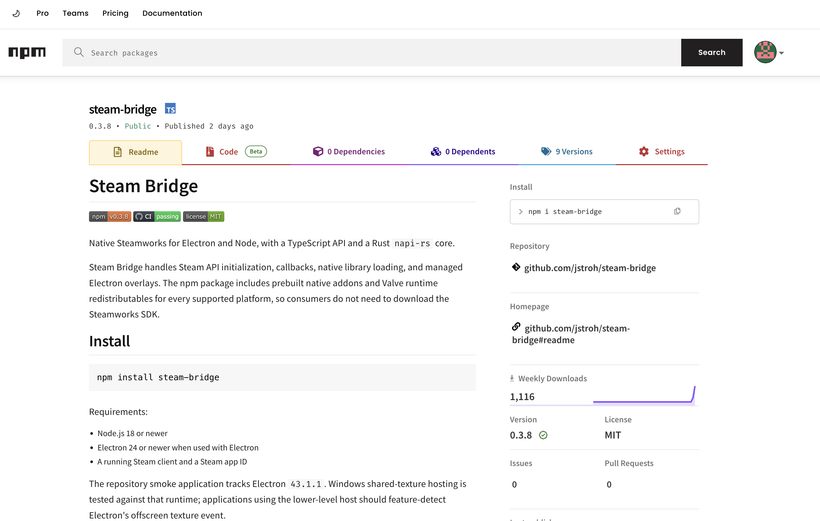
https://www.npmjs.com/package/steam-bridge Steam bridge is now on npm!
Steam Bridge full source: https://github.com/jstroh/steam-bridge
I have had OpenAI Codex working on Steam Bridge almost continuously for a full month now. The first commit was June 23, and the repository is already over 650 commits and up to version 0.3.8. This is still a 100% OpenAI Codex project. I choose what it works on and review the results, but OpenAI Codex has written the native code, Rust and TypeScript layers, tests, documentation, release tooling, commits, and fixes. I am still writing Fantasy Online 2 and PxEngine myself.
The first three days covered all 913 Steamworks entries being tracked at the time. In hindsight, that was the straightforward part. Steam Bridge now covers authentication, achievements, stats, cloud saves, inventory, workshop, input, networking, matchmaking, game servers, callbacks, the Steam Web API, and most of the rest of Steamworks through one typed API. The much harder job has been making Electron behave like a real Steam game instead of just proving that the API calls work.
Windows swallowed most of the month. OpenAI Codex tried the obvious ways of attaching the Steam overlay to an Electron window and kept proving why they were not good enough. Some approaches produced no Steam pixels at all. Others caused blank windows, duplicate presentation, broken focus, bad resizing, DPI problems, or unreliable Alt+Tab and fullscreen behavior. The current Windows version uses a real native D3D11 game window, with Electron rendering the game offscreen and passing its frames into that window. That gives Steam a proper game surface while the actual game can still be written with Electron.
The work has moved onto Linux now. Steam Deck Desktop Mode and Linux already have substantial overlay coverage, including Steam web pages, the Store, Friends, checkout preparation, achievement notifications, Shift+Tab, focus return, fullscreen, minimize and restore, and keeping the Steam surface completely idle when it is not being used. Native Wayland made this much harder because Steam still needs a hookable Xwayland surface, so Steam Bridge creates and manages that surface while keeping it aligned with the real Electron window. The current work is tightening the Linux launcher, packaging, and final release verification around that design.
After Linux, OpenAI Codex will return to Apple Silicon macOS for the final pass. macOS is not starting from zero. It already has broad signed-package testing for the Store, Friends, web pages, achievements, Steam notifications, checkout routing, shortcuts, focus return, and the normal window states. The final work is making sure the finished package and the actual FO2 integration still pass those checks after everything learned from Windows and Linux. Intel Macs are intentionally not a target.
This matters directly to the PX release. Steam authentication is now ported, but I cannot release PX on Steam until the Electron window, Steam API, overlay, checkout, and inventory delivery are reliable across Windows, Linux, and Apple Silicon. Steam Bridge started as a replacement for steamworks.js, but it has turned into the desktop runtime layer needed to make the Steam version work correctly without carrying the old overlay and window problems into PX. Until the exact FO2 builds pass on all three platforms, this remains the biggest blocker for the Steam PX release.
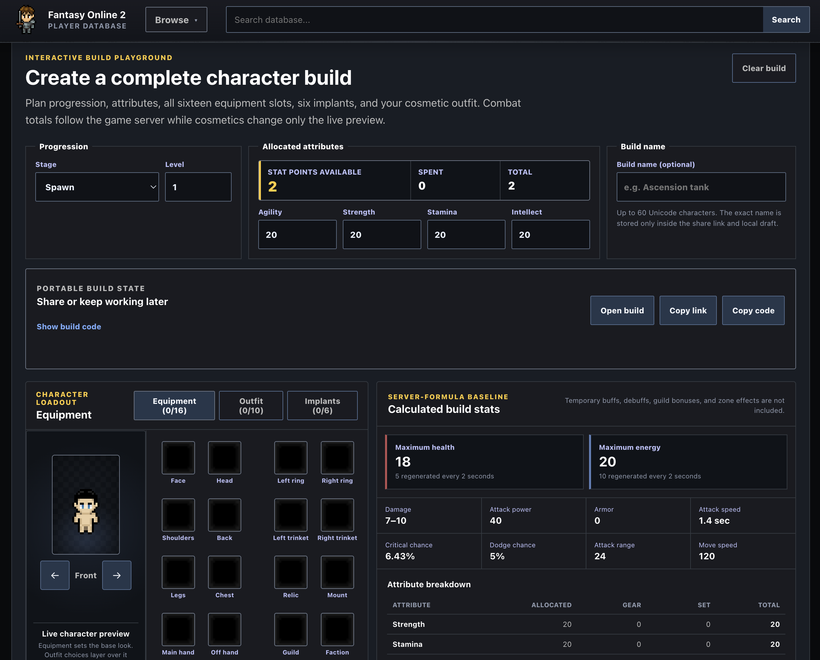
Steam Bridge is not the only project I have handed completely to OpenAI Codex. The new Fantasy Online 2 Database at https://db.fantasyonline2.com/ is also 100% OpenAI Codex generated. The old database had not been updated in months, so I decided to replace it instead of trying to keep patching an abandoned site. I told OpenAI Codex what I wanted, gave it access to the game data and source, and reviewed the results, but I did not write the website code. OpenAI Codex built the application, data pipeline, tests, documentation, deployment work, SEO, and all of the fixes. I am still writing Fantasy Online 2 and PxEngine myself. This is a separate project, just like Steam Bridge.
The result is much more than a new item list. The database connects items, mobs, NPCs, zones, quests, skills, shops, recipes, item sets, factions, achievements, Battle Passes, and Community Events, so you can follow where something comes from and what it is used for instead of bouncing between unrelated pages. It also has interactive zone maps, a full character build planner and dressing room, item comparisons, exact drop-chance calculations, player guides, searchable directories, and a changelog showing what changed between game-data releases.
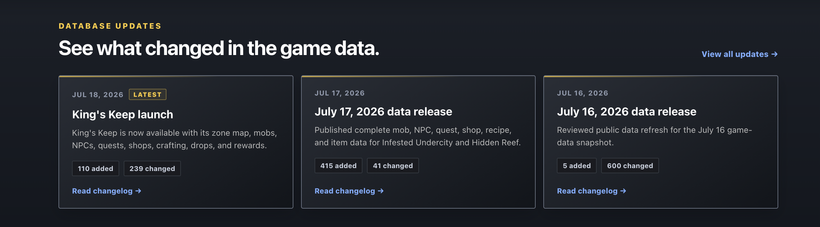
The part I am probably most impressed by is everything OpenAI Codex built underneath the pages. It did not just connect the public website directly to the production database and dump every table it found. The site is built from reviewed, read-only snapshots that separate released content from historical content, exclude private and developer-only data, validate the relationships between everything, and leave information unknown instead of filling gaps with guesses. Vercel never receives the production database credentials, and visiting a page does not run a query against the live game database.
It also handled all of the annoying work involved in replacing an existing indexed website. Old numeric links and stale URLs are preserved or redirected, pages have canonical metadata and structured previews, the sitemap stays within search-engine limits, and preview deployments remain blocked from indexing. The site has automated data refreshes, reviewed release snapshots, update feeds, crawler checks, and a large test suite covering everything from build codes and map markers to drop-rate math and whether unreleased game data can accidentally become public. That is why a release like King’s Keep can appear with its map, mobs, NPCs, quests, shops, recipes, drops, and rewards as one connected database update instead of someone manually editing dozens of pages.
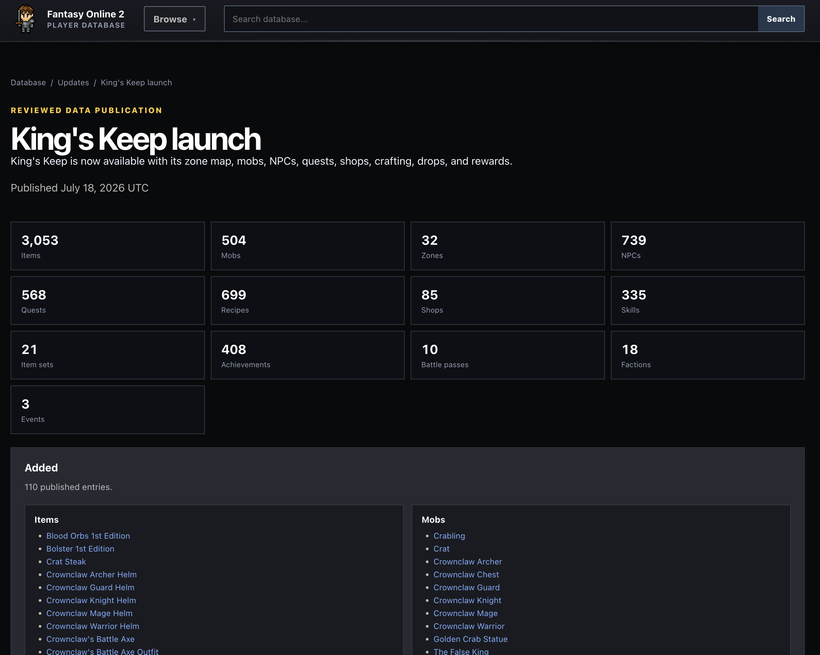
https://db.fantasyonline2.com/updates/2026-07-18
The repository started as a blank Create Next App project on July 12. By July 23, OpenAI Codex had made 66 commits and turned it into the live replacement site. Like Steam Bridge, this is a much better test than asking an AI to generate one impressive page. It has had to keep a real project coherent while the data model, tools, maps, search, mobile layouts, legacy links, SEO, release pipeline, and player-facing design all grew together. It is kind of ridiculous how quickly it went from an empty project to something that already feels more complete than the database site it replaced.
The funny thing is that neither Steam Bridge nor the database stayed a little side experiment. Steam Bridge is now the thing PX needs before the Steam build can ship, and the database has already replaced a site that had been sitting stale for months. OpenAI Codex built both from scratch while I kept working on Fantasy Online 2 and PxEngine, and both now have to hold up as real parts of the game instead of impressive demos.
The PX port checklist now stands at 40 of 44 items complete. What remains is Steam commerce and inventory delivery, the final Party and target-skill acceptance passes, Community Events, and the remaining Map markers and multi-zone performance work. Steam is still the biggest blocker because it depends on Steam Bridge proving the exact FO2 build on Windows, Linux, and Apple Silicon. The other items are much more contained.
This has been a ridiculous amount of progress for one devlog. The Market and Battle Passes were two of the last giant ports, Quest tracking and Welcome are back, and the two OpenAI Codex projects have gone from experiments to things Fantasy Online 2 actually depends on. I am not calling PX finished yet, but I know exactly what is left now. There are four checklist items, and for the first time I am not expecting another giant old-client system to crawl out from under a rock.
As always, please post comments or feedback here, on Discord, or email me.
Next devlog is in 1 week on August 2nd.
P.S. - Sale SSCs will be discontinued on August 3rd. They will return to sale sometime next year in 2027. If you'd like to get an SSC soon do it before time runs out!
P.P.S - We've started work on Fishing and Housing already! Expect a lot of polls over the next few months!